ComplianceAssist
Continuous AI auditing across 28 clinical domains. ComplianceAssist monitors your EHR records, surfaces documentation gaps, and delivers actionable corrections, routed to the right nurse, with the context to fix it in seconds.
No manual chart reviews. No correction backlogs. No gaps slipping through to survey day.
Get a Demo
How ComplianceAssist Works
Guardoc pulls clinical records from your EHR every few hours and runs hundreds of AI-powered rules across every resident chart - checking for documentation gaps, missing assessments, and compliance risks.
When an issue is found, a correction is created with a clear recommendation and routed directly to the right nurse inside the EHR - with a deep link to the exact section that needs attention.
Nurses resolve corrections in one click. Leadership tracks everything from the dashboard - correction trends, completion rates, and compliance posture across every facility.
We Audit What Surveyors Audit
28 clinical domains with active Auto Publish or AI Suggestion checks. From admission through discharge - every section of the chart that regulators, payers, and surveyors look at.
 Assessment / Documentation Due / OverduePsychotropicsFeeding TubesIVs / Access DeviceWeights and VitalsRespiratory SupportMedicationsCognitive Safety / ElopementLabwork / ResultsAntibioticsSkin / WoundsUrinary CatheterOstomy for OutputMedical DiagnosesImmunizationsNutrition / HydrationCode StatusFallsResident RightsDiabetic ManagementBehavioral / SleepResident IdentificationContinence / Bowel ManagementRespiratory TreatmentsInfectionsAllergiesProvider Visit / Consult DueBleeding Precautions
 FallsSkin / WoundsMedications
 PsychotropicsElopementCritical ValuesBehavioral IncidentsImmunizationsCare PlanNutritionScheduling & PRN+17 more
Surveyors don't limit themselves to 5 domains. Neither should your compliance tool.
Assessment Scheduler
Proactive tracking of assessments vs. MDS ARDs. Guardoc monitors whether required forms are completed on schedule and alerts assigned staff when they're not, so you catch documentation gaps before they affect compliance or reimbursement.
Trigger Events
New admissions. Ensures all admission assessments are completed on time.
Routine quarterly reviews. Tracks recurring assessment deadlines.
When resident condition changes substantially. Triggers required reassessments.
Discharge planning. Ensures all discharge assessments are filed before the resident leaves.
ComplianceAssist by the Numbers
Real production data from facilities running ComplianceAssist today.
Anatomy of a Correction
Every correction gives nurses and leadership the full picture - no guesswork.
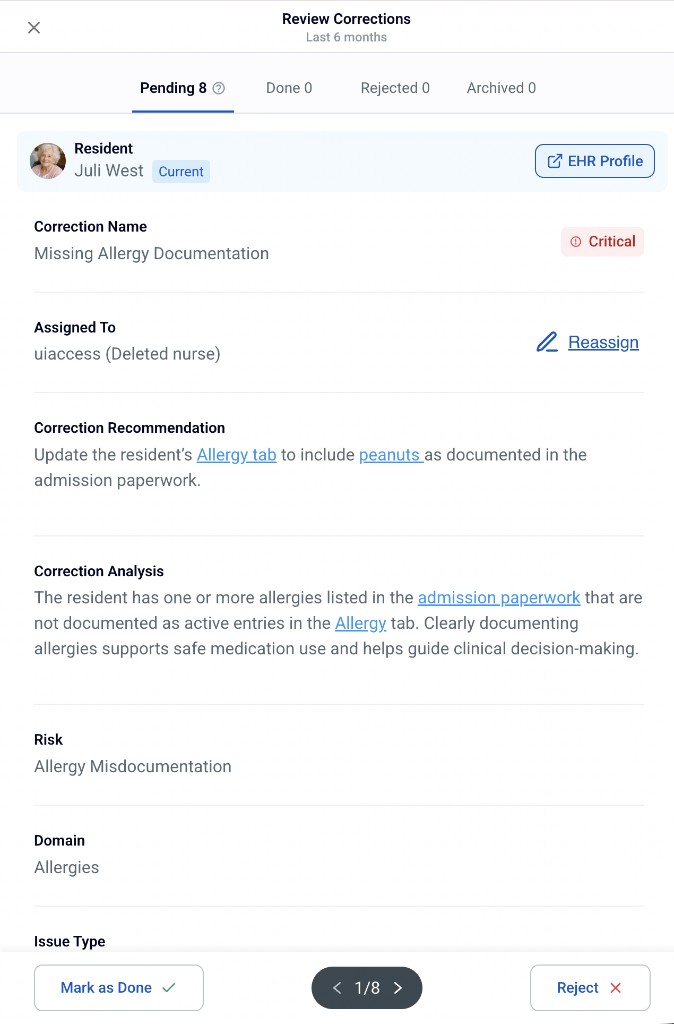
Pending, Done, Rejected, Archived - track every correction through its lifecycle.
Patient name, ID, status badge, and bulk actions for discharged residents.
A clear, specific title describing the compliance issue - e.g., "DNR Resident."
Routed to the right staff member. One-click reassignment if needed.
AI-generated guidance: exactly what needs to be documented or reconciled.
Clinical rationale with linked source records - click "Progress note" to jump directly to the evidence.
Classification of the failure - Incorrect documentation, Missing, Discrepancy, Compliance Risk, etc.
Mark as Done with a timestamp, navigate between corrections, or Reject with a documented reason.
See the full lifecycle in action
30-minute walkthrough - from referral ingestion to survey-ready reports.
Get a Demo